

Remember when I wrote disparaging articles about AI hallucinations and how Perplexity was doing a better job than ChatGPT or Gemini?
Forget all that. It’s ancient history. Those were written at the dawn of time, way back in (dismissive tone) 2025, and now it’s 2026, baby, and things have changed.
Here are some notes for all of you who are figuring out how to use AI for your personal lives. And you should be! Have your philosophical discussions of whether AI is good or bad for society, whether it will advance science or destroy humanity or both, it’s a great conversation over a glass of wine. But don’t let philosophy get in the way of using a helpful tool. The AI apps available today, right now, will improve your life today, right now.
This article isn’t for everyone. A lot of people are already committed to their AI app of choice and they don’t need my help.
Programmers are obsessed with Claude Code. It’s so freakishly good that coders’ careers are mutating in front of their eyes.
A lot of businesses are locked into Microsoft’s universe, so enterprise workers are likely using Microsoft Copilot and are struggling to keep up with Microsoft’s constantly shifting AI landscape.
Scientists, researchers, medical professionals, and lawyers are using a vast array of specialized AI tools.
Creatives and artists have so many AI choices that they’re overwhelmed – and it’s going to get worse. Or better, depending on your perspective.
This article is for everyone else – generalizations about ChatGPT and Gemini in February 2026.
There are no right answers about AI. The solution that works for you will be tailored to your own weird corner of the problem, and the corner keeps moving. But I’m going to forge ahead, offering advice that is sincere, contradictory, and guaranteed to age poorly.
ChatGPT & Google Gemini
Choose one. It kinda doesn’t matter. I’ll broadly describe some differences between them but the main thing is, start to use one. Make it a habit to ask AI when you’re doing a web search or getting a summary of a web page or seeking health advice (triple check the answer!) or looking for instructions or practically anything else that comes to mind.
There are other AIs for consumers besides ChatGPT and Gemini and hey, you do you. Perplexity is still good. Meta AI is finding its legs. Maybe you’re a right-wing white male and you want to use Grok, sure, whatever. But if you’re not already committed, ChatGPT and Gemini are the leaders for good reasons right now. Pick one.
You still might get hallucinations with ChatGPT and Gemini but it’s far less of a problem than it was six months ago. (They still happen. Stay alert.)
ChatGPT and Gemini both do web searches when necessary to answer with up to date information. Gemini is better at that.
Install your choice everywhere
Both ChatGPT and Gemini have apps for your phone. (ChatGPT iPhone & Android; Gemini iPhone & Android.) Install the app on your phone. Use it.
On a computer, you can use ChatGPT and Gemini at their websites, but don’t do that.
ChatGPT has a program you can install on Windows and Mac PCs.
Gemini is different. You use Chrome as your browser, right? There are Gemini buttons all over in the Chrome window but you can also make it look like a separate program.
- Go to gemini.google.com.
- In the browser address bar, look for the “Install” icon (usually a small computer screen with an arrow) or go to Settings (three dots) > Save and Share > Install page as app.
- When it’s running in its own window, right-click on the icon in the taskbar/dock and pin it in place.
Pay $20
Assume life just became $20 per month more expensive. Start a monthly subscription to ChatGPT’s or Gemini’s personal plan.
Take your time, I’ll wait. Get it out of your system. “No way! Subscriptions suck! I have a goddam spreadsheet of micro-rents for software, TV streaming, phone storage, air, sunlight, and now another one for goddam AI? Every goddam thing sends me passive/aggressive messages about my payment method expiring! I’m done with subscriptions!” (Shaking fist at the sky.)
Feeling better? Good. Now suck it up and go sign up for one of them. Current names: ChatGPT Plus and Google AI Pro.
The free version of each AI product today is carefully calibrated to be not quite good enough.
Everything I describe below assumes you have a paid plan and might be subtly or grossly different if you’re using AI for free.
ChatGPT and Gemini have different styles
I’m going to use a lot of words to describe ChatGPT and Gemini. If your eyes glaze over:
(1) It doesn’t matter, just pick one.
(2) Or maybe ask ChatGPT and Gemini to compare themselves and ask followup questions until you get an answer that works for you. That’s the point, they’re good at helping you think through things.
ChatGPT is warm and fuzzy. You’ll have conversations with it.
ChatGPT will get to know you over time and it will remember your preferences and things you tell it. If you’re working on a long-running project, ChatGPT will naturally remember your tone, your obsessions, your tolerance for ambiguity, and the decisions you’ve already rejected. Over time it behaves less like a generic advisor and more like a collaborator who knows how you think, what shortcuts annoy you, and which tradeoffs you usually accept.
If you engage in discussions with ChatGPT about opinions and values (and you should, it’s mind-blowing), it will come to understand your assumptions, how you reason, what kinds of framing helps you see blind spots, and what kinds of answers you find useless.
Gemini is more clinical. You’ll give it jobs to do, it will do them. It will do better at answering factual questions. It’s not a buddy to chat with but it’s a very capable assistant in Google services. Don’t undersell that. You use a lot of Google services.
Gemini will start each chat with fewer preconceptions about you – and it turns out that might be exactly what you want. When you’re searching for facts, you want a neutral summary, not an answer tuned to your preconceptions. There are several areas where Gemini’s freshness helps avoid contamination by prior chats. For example, confirmation bias – if ChatGPT comes to think I have a preference for Windows over Mac PCs, it might start to filter its research to please me. Another example: objective fact-checking – I’ve spent weeks planning a trip to Spain. ChatGPT might stop challenging bad ideas because it wants to be supportive.
Gemini is clean rooms, sharp boundaries, and disposable conversations. ChatGPT is a workshop where the sawdust on the floor tells a story.
We’re going to talk a lot more about persistent memory in the next article.
Tell ChatGPT & Gemini about your personality and preferences
Give instructions to ChatGPT and Gemini about who you are and how they should respond. You’re planting permanent memories so you don’t have to repeat yourself.
ChatGPT instructions
In ChatGPT, click on your name in the lower left / Personalization. There are two boxes. One controls how it talks, the other tells it who you are.
The first is Custom Instructions. Translation: How do you want ChatGPT to respond? You can tell ChatGPT you are technically literate, or that you prefer responses in prose instead of bullet points, or to put summaries first and details later, or to adopt a casual tone, or to ask follow-up questions if your prompt is ambiguous, or to avoid emojis, or any of a thousand things.
You’re confused about what to put in. If only there was a tool near at hand that could help you figure that out. (slaps forehead) I know! Paste this prompt into ChatGPT: “What are commonly used custom instructions in ChatGPT personalization?”
The other is More about you. Translation: Who are you? Background and expertise; ongoing projects that provide general background (changing careers, writing a book); accessibility needs; basically anything that would help ChatGPT avoid giving answers that are technically correct but practically wrong for your life.
Gemini instructions
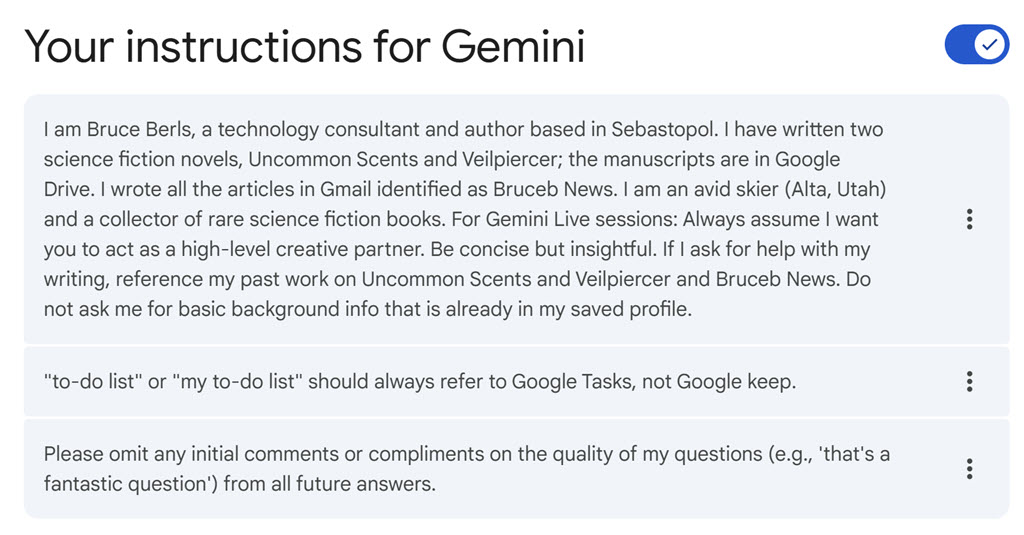
In Gemini, click on your name in the lower left / Personal Intelligence / Instructions for Gemini.
You can add as many boxes as you like, and you can describe when to consult them – this instruction applies when I’m writing a tech article, this instruction applies when I’m researching travel, this instruction is my overall preference. If I have a block about “Writing Style” and a block about “Skiing,” Gemini is less likely than ChatGPT to accidentally use my snarky writing tone while discussing my trip to Alta.
It’s a subtle difference. You don’t have to obsess. Ask ChatGPT or Gemini for help to come up with some basic info about yourself, then remember the instructions exist so you can refine them over time. I’ve just begun this process; here’s a screenshot of my Gemini instructions as an example.
ChatGPT is far more likely to be the AI that people fall in love with or use for therapy in clickbait news stories. The secret is the conversational style and what it learns and remembers about you even without instructions.
In the next article, we’ll talk more about the persistence of memory. How much do the AIs learn about us, how much do they remember from one chat to another, do you have to do anything to make them store memories? It’s fascinating stuff. Don’t roll your eyes, I mean it. And remember, all this material will be on the final.